
Turn Your Wearables into Trusted Media Contributors.
Parent Asset Example - View on Aeneid Explorer
Derivative Asset Example - View on Aeneid Explorer
Depth metadata of an example image captured - View Here
On your Raspberry Pi (4GB RAM or above), run the following command:
git clone https://github.com/Marshal-AM/deepshare.git && cd raspberry-pi && chmod +x register_device.sh && ./register_device.shSet your minting fee and royalty share percentage.
Scan the generated QR Code and register your device in the DeepShare platform.
Start capturing images!
Visit the DeepShare marketplace - Click Here.
Select the asset you want to use.
Press "Use this Asset".
NOTE: Make sure you have enough $IP testnet tokens to complete this transaction. You can obtain testnet tokens from the Story Protocol Aeneid Faucet.
You now have rights to the asset!
DeepShare is continuously evolving to expand device compatibility and enhance verification capabilities. The following developments are currently in active development:
Video Upload Support (XR Motion Capture): Extending the platform to support video uploads with depth data from XR motion capture systems. This will enable verification of dynamic events and motion sequences, providing temporal depth information that complements static image captures. The system will process video frames with depth metadata and create verifiable video assets on the blockchain.
Mobile Device Support: Developing support for Android devices with dual camera systems using Termux, enabling users to capture depth-verified images directly from their smartphones. This expansion will significantly increase accessibility, allowing anyone with a compatible Android device to contribute verified content without requiring specialized hardware.
Meta Ray-Ban Smart Glasses Integration: Creating a mobile application that interfaces with Meta Ray-Ban smart glasses to enable hands-free depth-verified image capture. This development will provide a seamless, wearable solution for real-time evidence capture, making verification accessible in field conditions where traditional cameras may be impractical.
AI-Powered Verification Layer: Implementing an additional verification layer that uses machine learning models to analyze depth data patterns and detect anomalies that might indicate tampering or synthetic generation. This complementary verification mechanism will work alongside cryptographic proofs to provide multi-layered authenticity validation, further strengthening the platform's ability to distinguish genuine captures from AI-generated content.
DeepShare is a platform that enables users to upload images coupled with their corresponding depth metadata and mint intellectual property (IP) rights for both the image and its depth data. The platform combines stereo vision depth mapping technology with blockchain-based IP protection to create a verifiable, tamper-proof system for authenticating real-world visual data.
The proliferation of highly convincing AI-generated images has created a critical challenge in distinguishing between verified, authentic data and synthetically generated content. This problem has become a significant source of misinformation and public confusion, as demonstrated by recent incidents where AI-generated content has been mistaken for real events.
(We saw one such incident literally when writing this readme! Click here to read)
The inability to verify the authenticity of visual data has far-reaching consequences across multiple sectors. Organizations that rely on accurate, real-world data face increasing difficulty in sourcing trustworthy visual content. This challenge affects:
News Outlets: Media organizations require verified proof captured by actual individuals in the physical world to ensure the authenticity of their reporting and maintain public trust.
Scientific Researchers: Research institutions need access to genuine, depth-verified imagery to ensure the accuracy and reproducibility of their findings.
Law Enforcement and Legal Systems: Courts and investigative agencies require credible visual evidence with verifiable provenance for use in legal proceedings.
Educational Institutions: Academic institutions need authentic visual data for educational purposes, ensuring students receive accurate information.
Medical and Healthcare: Healthcare providers and medical researchers require verified imaging data for diagnostic and research purposes.
Architecture and Construction: Professionals in these fields need accurate spatial data for planning, documentation, and verification purposes.
The current information ecosystem lacks a reliable mechanism to verify the physical authenticity of visual data, creating vulnerabilities that can be exploited to spread misinformation and undermine trust in digital content.
DeepShare addresses this challenge through a comprehensive system that combines depth-verified image capture with blockchain-based intellectual property registration. The platform consists of two primary components:
We have developed specialized software that can run on wearables and other portable devices such as smart glasses and mobile phones with dual camera systems or devices equipped with LIDAR sensors. This software captures images along with their corresponding depth metadata and directly mints intellectual property rights using Story Protocol for both the image and its depth data.
The software has been tested and validated in the following prototype setup:
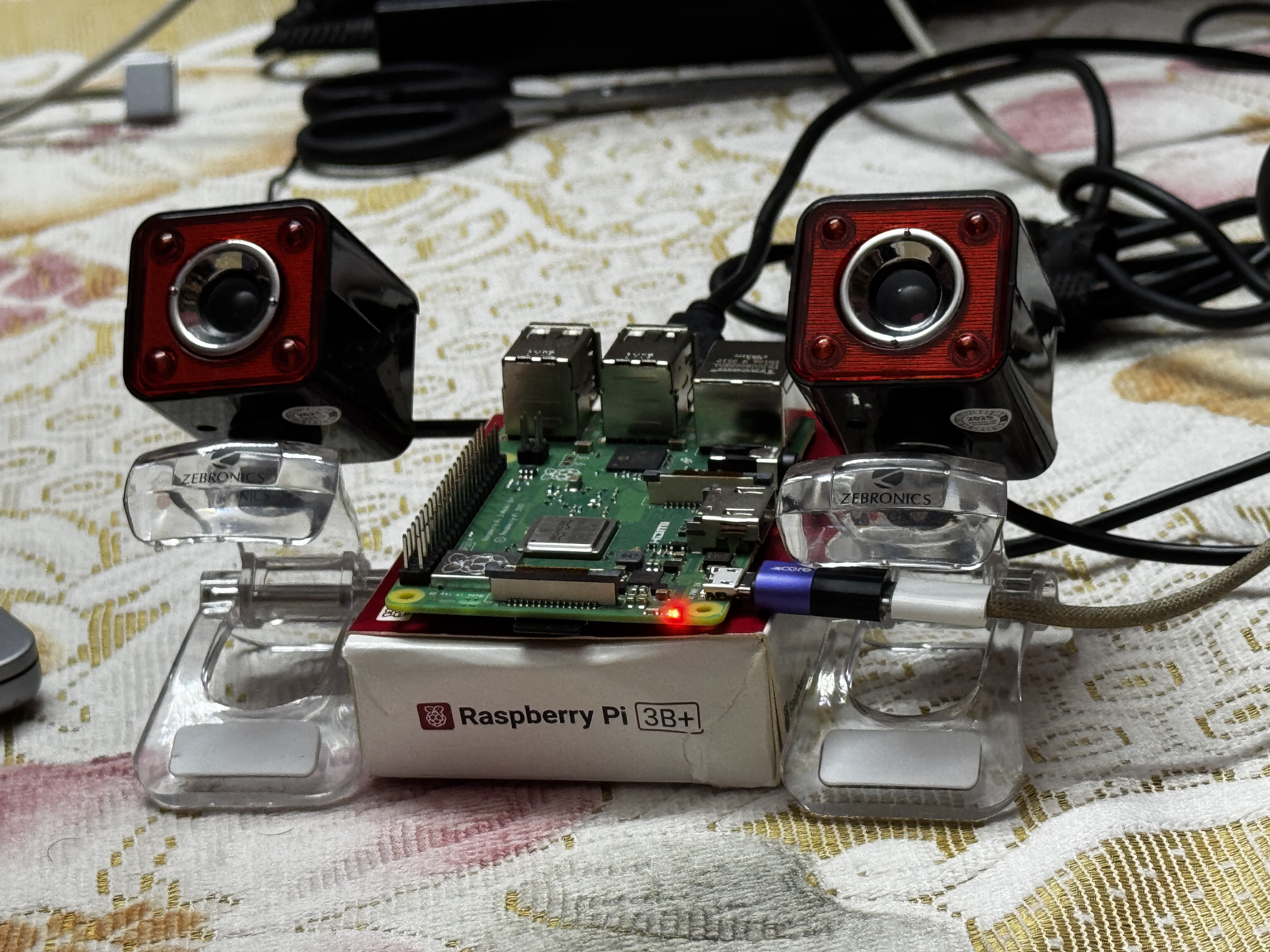
The capture system uses stereo vision depth mapping to generate accurate depth information, which serves as a cryptographic proof of physical authenticity. Each captured image is cryptographically signed using EIP-191 signatures, creating an immutable record of the capture event.
We have developed a web-based platform where users can register their capture devices and organizations requiring verified data can browse uploaded images and mint derivatives for their use. The platform provides:
Device Registration: Users register their capture devices, which generates a unique cryptographic identity linked to the device hardware.
Image Marketplace: Organizations can browse verified images with depth metadata, view licensing terms, and mint derivatives for commercial or non-commercial use.
Royalty Management: Automated royalty distribution ensures image contributors receive compensation when their data is used by others.
IP Asset Management: All registered images are minted as IP assets on Story Protocol, providing blockchain-backed provenance and licensing terms.
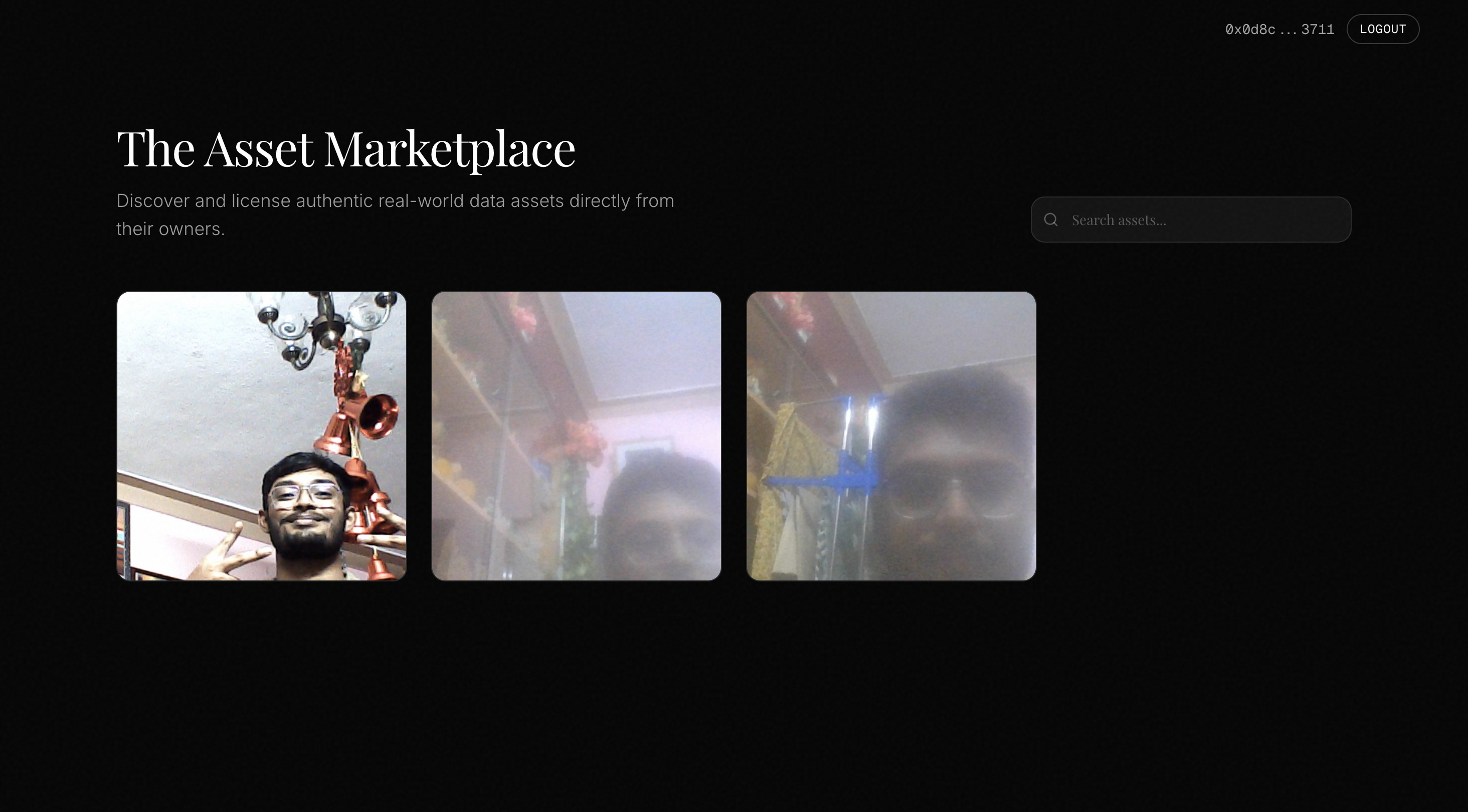
This solution provides value to all parties involved:
Image Contributors: Contributors receive ongoing royalties through Story Protocol's Programmable IP License (PIL) system when organizations mint derivatives of their uploaded data. This creates a sustainable economic model that incentivizes the capture and sharing of authentic real-world data.
Organizations Requiring Trusted Data: News outlets, scientific research institutions, law enforcement agencies, educational institutions, and other organizations gain access to a marketplace of verified, depth-authenticated visual data. Each asset includes cryptographic proof of physical capture, enabling organizations to confidently use the data knowing it represents genuine real-world content.
General Public: As the platform scales, the widespread availability of verified, blockchain-authenticated data creates a fundamental shift in how society consumes visual information. By providing accessible verification mechanisms, the platform addresses the root cause of misinformation: the inability to distinguish authentic content from AI-generated fabrications. This infrastructure has the potential to significantly reduce the impact of AI-generated fake news and restore trust in digital visual content, creating a more informed and resilient information ecosystem.
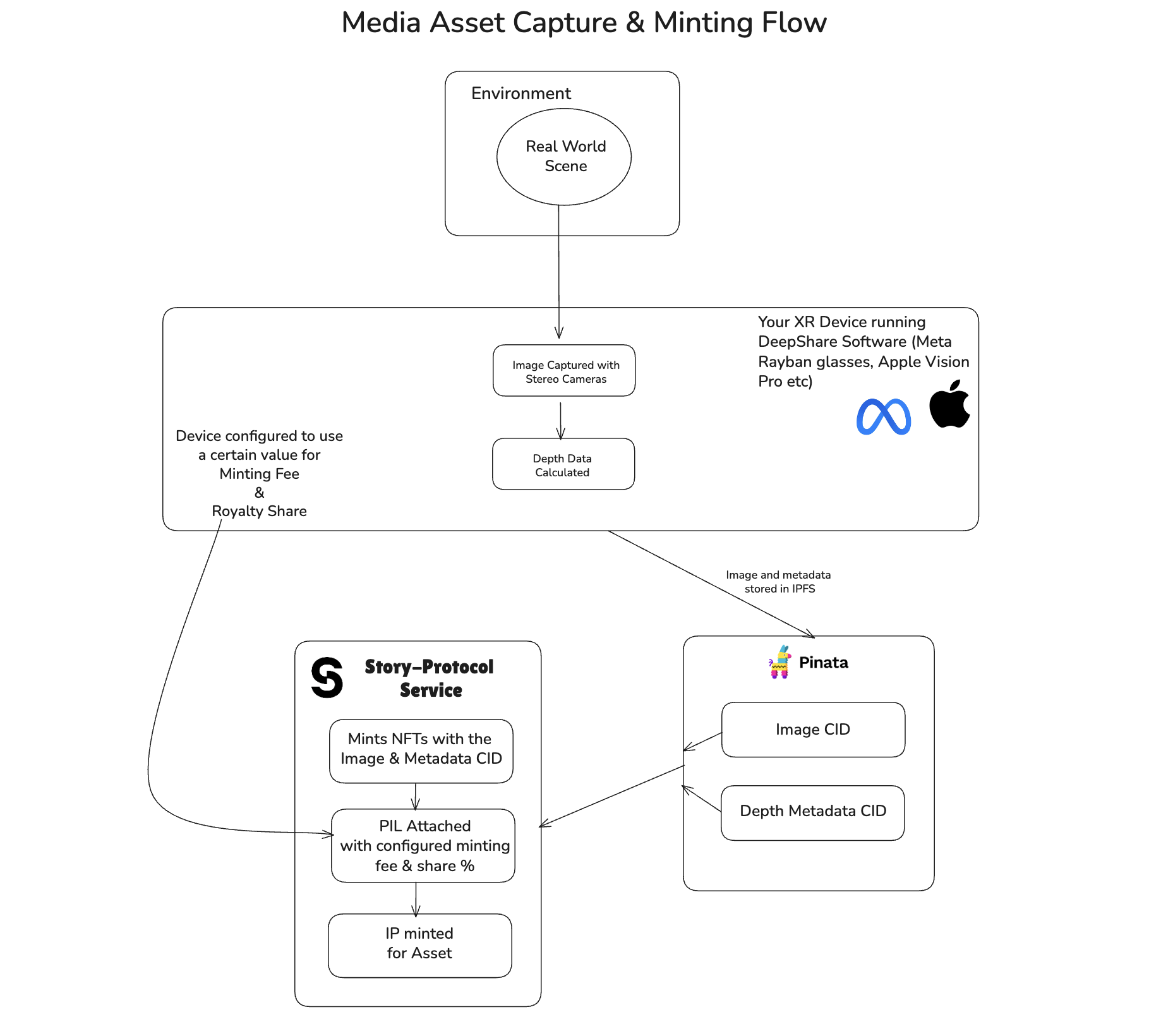
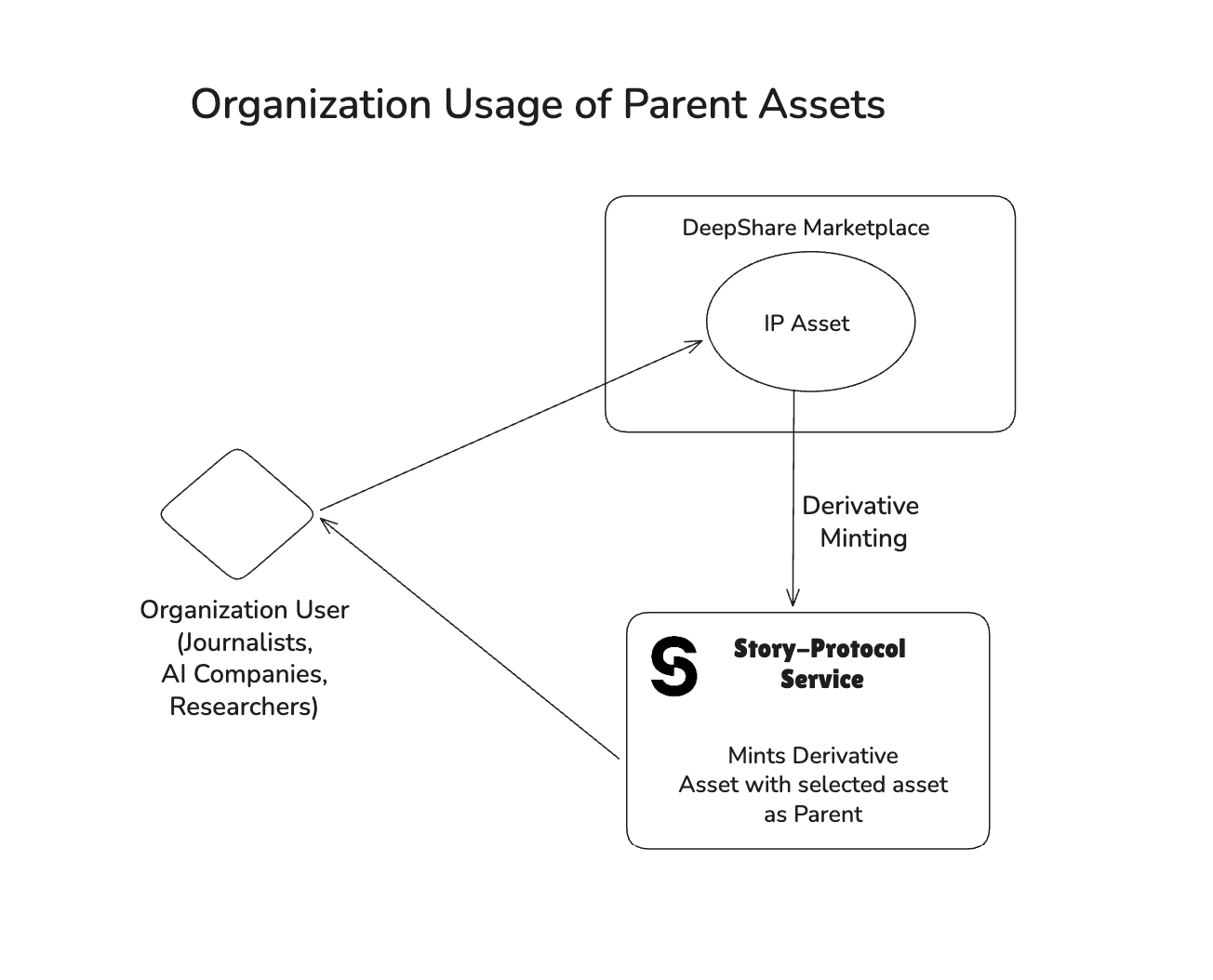
DeepShare operates through a six-phase pipeline that transforms physical image capture into blockchain-verified intellectual property assets:
Device Calibration: Stereo cameras are calibrated using checkerboard patterns to generate rectification maps and depth computation parameters. This establishes the geometric relationship between cameras required for accurate depth mapping.
Device Registration: Each capture device generates a unique Ethereum wallet and registers with the platform. Device hardware details are collected and linked to the wallet address, creating a cryptographic identity for the device. The device owner configures licensing terms including minting fees and revenue share percentages.
Image Capture & Depth Mapping: The device captures synchronized stereo images, computes depth maps using Semi-Global Block Matching (SGBM) algorithms, and creates a cryptographically signed payload. Each capture includes the original image, depth data, and an EIP-191 signature proving authenticity.
IPFS Upload & Storage: Images and metadata are uploaded to IPFS via Pinata, generating Content Identifiers (CIDs). The platform stores image CIDs, metadata CIDs, and wallet addresses in Supabase for querying and marketplace display.
IP Asset Registration: Captured images are registered as IP assets on Story Protocol. The system creates IP metadata and NFT metadata, uploads them to IPFS, mints NFTs in a collection, and attaches Programmable IP Licenses (PIL) with configured minting fees and revenue shares. The IP asset ID and transaction hash are stored in Supabase.
Derivative IP Minting: Organizations browse the marketplace, select assets, and mint derivative IP assets. Users select license terms (commercial or non-commercial), the system generates derivative metadata, uploads it to IPFS, and registers the derivative on Story Protocol. The derivative links to the parent IP asset and stores licensing information in Supabase.
Each phase builds upon the previous, creating an immutable chain of provenance from physical capture to blockchain registration, enabling verifiable authenticity and automated royalty distribution.
Location: raspberry-pi/callibration/calibrate.py
Purpose: Calibrate stereo cameras to enable accurate depth mapping.
Capture Calibration Images
Take multiple pairs of images (left/right) of a checkerboard pattern
Store in calibration_images/ directory
Typically 30-40 image pairs for accuracy
Monocular Calibration
Calibrate each camera individually
Computes camera matrix and distortion coefficients
Improves overall stereo calibration accuracy
Stereo Calibration
Compute relative position and orientation between cameras
Calculates rotation matrix (R) and translation vector (T)
Essential parameters: Essential matrix (E) and Fundamental matrix (F)
Rectification
Generate rectification maps for both cameras
Ensures epipolar lines are horizontal
Output: stereo_params.npz containing:
mapL1, mapL2: Left camera rectification maps
mapR1, mapR2: Right camera rectification maps
Q: Disparity-to-depth mapping matrix
Camera matrices and distortion coefficients
cd raspberry-pi/callibration
python calibrate.pyOutput: stereo_params.npz (required for depth mapping)
Location: raspberry-pi/register_device.sh + raspberry-pi/generate_wallet.py
Purpose: Register device in the system and generate cryptographic identity.
Wallet Generation (generate_wallet.py)
Creates new Ethereum wallet using eth_account
Generates private key and wallet address
Collects device hardware details (hostname, MAC, serial, etc.)
Device Registration (register_device.sh)
Generates QR code with registration URL
URL includes wallet address and device details
Prompts for IP licensing configuration:
Minting Fee: Cost to mint a license (in IP tokens)
Revenue Share: Percentage for commercial use (0-100%)
Frontend Registration
User scans QR code or visits registration URL
Reviews device details
Submits registration to backend
Backend Storage (backend/main.py)
Stores device in Supabase Devices table
Links wallet address to device details
Enables device verification for captures
Configuration Storage
Saves to .env file:
PRIVATE_KEY: Device's private key (for signing)
WALLET_ADDRESS: Device's wallet address
IP_MINTING_FEE: License minting fee
IP_REVENUE_SHARE: Revenue share percentage
STORY_SERVER_URL: Story Protocol server URL
IPFS_SERVICE_URL: IPFS backend service URL
cd raspberry-pi
./register_device.shPrerequisites:
Python 3 with eth-account and qrcode packages
Backend service running and accessible
Frontend registration page available
Output:
.env file with device credentials
QR code for registration
Device registered in Supabase
Location: raspberry-pi/depthmap.py
Purpose: Capture stereo images, compute depth maps, and prepare signed payload.
Camera Initialization
Opens left and right cameras
Loads calibration parameters from stereo_params.npz
Configures camera settings (640x480, 15 FPS)
Image Capture
Synchronized capture from both cameras
Rectifies images using calibration maps
Ensures epipolar alignment
Depth Computation
Uses Semi-Global Block Matching (SGBM) algorithm
Computes disparity map
Converts disparity to depth using Q matrix
Visualization
Creates 5-view display:
Top Row: Left Camera | Right Camera | Stereo Depth Map
Bottom Row: Depth-Enhanced View | Depth Overlay Visualization
Data Capture (SPACE key)
Saves left image as JPEG
Saves composite view image
Compresses depth data:
Stores only valid (non-zero) pixels
Saves indices and values separately
Includes statistics (min, max, mean, std)
Payload Creation
Converts images to base64
Compresses depth data
Creates data structure:
{
  "timestamp": 1234567890,
  "baseImage": "base64_encoded_jpeg",
  "depthImage": "base64_encoded_composite",
  "depthData": {
    "shape": [480, 640],
    "dtype": "float32",
    "min": 0.5,
    "max": 10.0,
    "mean": 3.2,
    "std": 1.5,
    "valid_pixels": 150000,
    "indices_y": [...],
    "indices_x": [...],
    "values": [...]
  }
}
EIP-191 Signing
Signs payload using device's private key
Uses Ethereum message signing (EIP-191)
Creates cryptographic proof of authenticity
Final Payload
{
  "data": { /* payload from step 6 */ },
  "signature": "0x1234...abcd"
}SPACE: Capture image and upload to IPFS
+/-: Adjust depth blend strength
s: Save full screenshot
x: Swap left/right cameras
ESC: Exit
cd raspberry-pi
python depthmap.pyPrerequisites:
Calibration complete (stereo_params.npz exists)
Device registered (.env file with credentials)
Two cameras connected and accessible
Output:
Local image files (capture_<timestamp>_left.jpg)
Depth metadata JSON (depth_meta_<timestamp>.json)
Compressed depth data (depth_data_<timestamp>.npz)
Location: backend/main.py
Purpose: Upload images and metadata to IPFS via Pinata, store CIDs in Supabase.
Receive Upload Request
Endpoint: POST /upload-json
Receives:
wallet_address: Device wallet address
image: Original JPEG image file
metadata: JSON string with full payload (base64 images, depth data, signature)
Image Upload to IPFS
Uploads original image to Pinata
Creates metadata with wallet address
Returns image CID (Content Identifier)
Metadata Upload to IPFS
Uploads full metadata JSON to Pinata
Includes:
Base64 encoded images
Compressed depth data
EIP-191 signature
Timestamp
Image CID reference
Returns metadata CID
Supabase Storage
Stores in images table:
wallet_address: Device wallet (lowercase)
image_cid: IPFS CID of original image
metadata_cid: IPFS CID of metadata JSON
Enables querying by wallet address
Response
{
  "success": true,
  "cid": "QmaLRFE...",
  "metadata_cid": "bafybeico...",
  "gateway_url": "https://gateway.pinata.cloud/ipfs/...",
  "wallet_address": "0x..."
}Health Check:
GET /healthCheck Registration:
GET /check-registration/{wallet_address}
Response: { "registered": true, "wallet_address": "0x..." }
Upload Image & Metadata:
POST /upload-json
Content-Type: multipart/form-data

Form Data:
- wallet_address: "0x..."
- image: <JPEG file>
- metadata: <JSON string>Environment Variables (.env):
# Pinata Configuration
PINATA_JWT=your_jwt_token
# OR
PINATA_API_KEY=your_api_key
PINATA_SECRET_KEY=your_secret_key
PINATA_GATEWAY=your_gateway.mypinata.cloud

# Supabase Configuration
SUPABASE_URL=https://your-project.supabase.co
SUPABASE_SERVICE_ROLE_KEY=your_service_role_keycd backend
python main.py
# Server runs on port 8000 (default)Prerequisites:
Pinata account with API credentials
Supabase project with images and Devices tables
Python dependencies installed
Location: story-server/server.js + raspberry-pi/register_ip_asset.py
Purpose: Register captured images as IP assets on Story Protocol with commercial licenses.
Device Initiates Registration (register_ip_asset.py)
Called automatically after successful IPFS upload
Sends request to Story Protocol server:
{
  "imageCid": "QmaLRFE...",
  "metadataCid": "bafybeico...",
  "depthMetadata": { /* depth stats */ },
  "deviceAddress": "0x...",
  "mintingFee": "0.1",
  "commercialRevShare": 10
}
Story Server Processing (server.js)
Receives registration request
Fetches metadata from IPFS (if needed)
Creates IP metadata (Story Protocol format)
Creates NFT metadata (OpenSea compatible)
Uploads both metadata JSONs to IPFS
Collection Management
Creates NFT collection on first registration
Collection name: "DeepShare Evidence Collection"
Symbol: "DEEPSHARE"
Reuses collection for subsequent registrations
IP Asset Registration
Registers IP asset using Story Protocol SDK
Mints NFT in the collection
Attaches commercial license (PIL - Programmable IP License):
Minting Fee: Cost to mint a license (in IP tokens)
Revenue Share: Percentage for commercial use
Currency: WIP token (Story Protocol's native token)
Metadata Structure
IP Metadata (Story Protocol):
{
  "title": "DeepShare Evidence - 1234567890",
  "description": "Evidence capture with depth mapping...",
  "image": "ipfs://QmaLRFE...",
  "mediaUrl": "ipfs://bafybeico...",
  "creators": [{
    "name": "DeepShare Device",
    "address": "0x...",
    "contributionPercent": 100
  }],
  "attributes": [
    { "key": "Platform", "value": "DeepShare" },
    { "key": "Device", "value": "0x..." },
    { "key": "ImageCID", "value": "QmaLRFE..." }
  ]
}
NFT Metadata (OpenSea compatible):
{
  "name": "DeepShare Evidence 1234567890",
  "description": "Evidence captured with depth mapping...",
  "image": "ipfs://QmaLRFE...",
  "animation_url": "ipfs://bafybeico...",
  "attributes": [
    { "trait_type": "Platform", "value": "DeepShare" },
    { "trait_type": "Device", "value": "0x..." },
    { "trait_type": "Has Depth Data", "value": "Yes" }
  ]
}
Supabase Update
Updates images table with:
ip: IP asset explorer URL
tx_hash: Blockchain transaction hash
Response
{
  "success": true,
  "data": {
    "ipId": "0xF0A67d1776887077E6dcaE7FB6E292400B608678",
    "tokenId": "1",
    "txHash": "0x54d35b50694cd...",
    "nftContract": "0xBBE83B07463e5784BDd6d6569F3a8936127e3d69",
    "explorerUrl": "https://aeneid.explorer.story.foundation/ipa/0xF0A...",
    "mintingFee": 0.1,
    "commercialRevShare": 10
  }
}Environment Variables (story-server/.env):
# Server Wallet (pays for all registrations)
PRIVATE_KEY=0x...

# Network Configuration
RPC_URL=https://aeneid.storyrpc.io
CHAIN_ID=aeneid
PORT=3003

# Default Royalty Settings (can be overridden per request)
DEFAULT_MINTING_FEE=0.1
DEFAULT_COMMERCIAL_REV_SHARE=10

# IPFS Gateway
IPFS_GATEWAY=https://gateway.pinata.cloud

# Pinata (for metadata uploads)
PINATA_API_KEY=...
PINATA_SECRET_KEY=...

# Supabase (for storing IP registration data)
SUPABASE_URL=https://your-project.supabase.co
SUPABASE_SERVICE_ROLE_KEY=...Start Story Server:
cd story-server
npm install
npm start
Manual Registration (from device):
cd raspberry-pi
python register_ip_asset.py <image_cid> <depth_meta_file> [metadata_cid] [minting_fee] [revenue_share]Prerequisites:
Story Protocol SDK installed
Server wallet funded with IP tokens (for gas fees)
Supabase configured
Pinata credentials for metadata uploads
Gas Costs:
Collection creation: ~0.037 IP (one-time)
IP registration: ~0.037 IP (per image)
Estimate: ~100 images per 10 IP tokens
Example IP Asset:
Location: frontend/app/marketplace/page.tsx + frontend/components/marketplace/use-asset-modal.tsx + frontend/lib/story-client.ts
Purpose: Enable organizations to mint derivative IP assets from marketplace assets, creating licensed derivative works with automated royalty distribution.
Marketplace Asset Selection (page.tsx, marketplace-modal.tsx)
User browses marketplace assets via the frontend
Each asset displays image preview, device information, and IP asset details
User clicks on an asset to view full details including:
Image CID and metadata CID
Device owner information
IP asset explorer link
Transaction hash
License Terms Fetching (use-asset-modal.tsx)
Frontend extracts IP address from asset's IP field (handles both URL and direct address formats)
Creates Story Protocol client using user's MetaMask wallet (story-client.ts)
Fetches attached license terms from the parent IP asset
Displays available license options:
Commercial License: Requires minting fee and revenue share percentage
Non-Commercial Social Remixing: Free for non-commercial use
License Selection
User selects desired license type
System displays:
Minting fee in WIP tokens
Revenue share percentage (if commercial)
License description
Derivative Metadata Generation
Creates IP metadata using Story Protocol format:
{
  "title": "Derivative of Asset #123",
  "description": "A derivative work created from marketplace asset #123...",
  "createdAt": "1234567890",
  "creators": [{
    "name": "Derivative Creator",
    "address": "0x...",
    "contributionPercent": 100
  }],
  "image": "ipfs://QmaLRFE..."
}
Creates NFT metadata:
{
  "name": "Derivative Asset #123",
  "description": "Derivative NFT representing usage rights...",
  "image": "ipfs://QmaLRFE...",
  "attributes": [
    { "key": "Parent Asset ID", "value": "123" },
    { "key": "License Type", "value": "Commercial" },
    { "key": "Original Owner", "value": "0x..." }
  ]
}
IPFS Upload (ipfs.ts)
Uploads both IP metadata and NFT metadata to IPFS
Generates SHA-256 hashes for both metadata objects
Returns IPFS CIDs for both metadata files
Derivative Registration (story-client.ts)
Uses Story Protocol SDK to register derivative IP asset:
client.ipAsset.registerDerivativeIpAsset({
  nft: {
    type: 'mint',
    spgNftContract: SPGNFTContractAddress
  },
  derivData: {
    parentIpIds: [parentIpAddress],
    licenseTermsIds: [selectedLicenseId]
  },
  ipMetadata: {
    ipMetadataURI: ipfsUrl,
    ipMetadataHash: "0x...",
    nftMetadataURI: nftIpfsUrl,
    nftMetadataHash: "0x..."
  }
})
Links derivative to parent IP asset
Attaches selected license terms
Mints NFT representing derivative rights
Database Storage (app/api/story/store-derivative/route.ts)
Stores derivative information in Supabase derivatives table:
owner_address: User who minted the derivative
parent_asset_id: Original marketplace asset ID
parent_ip_id: Parent IP asset address
derivative_ip_id: New derivative IP asset address
tx_hash: Blockchain transaction hash
image_cid: Image CID reference
metadata_cid: Original metadata CID
ip_metadata_cid: Derivative IP metadata CID
nft_metadata_cid: Derivative NFT metadata CID
license_terms_id: License terms ID used
Response
Returns derivative IP ID and transaction hash
Displays success confirmation with:
Derivative IP ID
Transaction hash (linked to Aeneid explorer)
Link to view derivative on Story Protocol explorer
Marketplace Page (page.tsx):
Displays grid of marketplace assets
Search functionality
Asset card with preview and metadata
Opens asset modal on click
Marketplace Modal (marketplace-modal.tsx):
Displays full asset details
Shows image preview, technical details, and owner information
"Use This Asset" button opens derivative minting modal
Use Asset Modal (use-asset-modal.tsx):
License selection interface
Metadata generation and IPFS upload
Story Protocol transaction handling
Success/error state management
Story Client (story-client.ts):
Creates Story Protocol client from MetaMask wallet
Handles chain switching to Aeneid network
Provides SDK client for derivative registration
Frontend Environment Variables:
# Story Protocol Configuration
NEXT_PUBLIC_STORY_RPC_URL=https://aeneid.storyrpc.io

# IPFS Configuration (for metadata uploads)
NEXT_PUBLIC_PINATA_JWT=...
# OR
NEXT_PUBLIC_PINATA_API_KEY=...
NEXT_PUBLIC_PINATA_SECRET_KEY=...From Marketplace:
Navigate to /marketplace
Browse available assets
Click on an asset to view details
Click "Use This Asset"
Select license type (commercial or non-commercial)
Confirm transaction in MetaMask
View derivative IP asset details
Prerequisites:
MetaMask wallet connected
Wallet switched to Aeneid network (automatic)
Sufficient WIP tokens for minting fee (if commercial license)
Parent asset must have registered IP asset
Gas Costs:
Derivative registration: ~0.037 IP (per derivative)
Minting fee: Variable (set by asset owner for commercial licenses)
Revenue share: Percentage of commercial revenue (paid on use)
Example Derivative Asset:
DeepShare represents a fundamental shift in how we verify and authenticate visual data in an era increasingly dominated by AI-generated content. By combining depth mapping technology with blockchain-based intellectual property protection, the platform creates an immutable chain of provenance from physical capture to blockchain registration.
The system addresses a critical gap in the information ecosystem: the inability to reliably distinguish between authentic, real-world content and synthetically generated material. Through cryptographic signatures, depth data verification, and blockchain-backed IP registration, DeepShare provides organizations and individuals with a trusted mechanism for sourcing and licensing verified visual data.
The platform's economic model, built on Story Protocol's Programmable IP License system, creates sustainable incentives for content creators while enabling organizations to access verified data with confidence. As the platform scales and expands device compatibility, it has the potential to significantly reduce the impact of misinformation and restore trust in digital visual content.
Looking forward, the ongoing developments in video support, mobile device integration, and wearable technology will further democratize access to verified content capture, making authenticity verification accessible to a broader range of users and use cases. DeepShare is not just a technical solution—it is a foundational infrastructure for building a more trustworthy information ecosystem in the age of AI.